
general
Running Claude Code in a Loop

@jfdelarosa
January 25, 2026
It’s been a long time since I last wrote on this blog.
Not because I had nothing to say, quite the opposite. Since the last post, a lot changed. New ideas showed up. I started a bunch of side projects. Some shipped, some stalled, and many quietly died. That’s just how it goes when you’re building constantly.
Most of the work was done thanks to Cursor . It genuinely changed how I wrote code. Faster feedback loops, less friction, more flow. It earned its hype.
But lately, I’ve switched sides.
I’m now a big fan of Claude Code .
The quality of reasoning, refactors, and long-context understanding feels like a step up, especially for real-world codebases. It’s not perfect, but it fits how I think and work today.
A long-running coding agent is an AI assistant that works on coding tasks autonomously over multiple iterations, maintaining context between runs. Unlike a single prompt-response interaction, these agents:
- Persist state across multiple executions
- Track progress on multi-step tasks
- Accumulate context from previous decisions and code changes
- Work independently while you do other things
The problem they solve
Traditional AI coding assistants are stateless. You ask a question, get an answer, and start fresh next time. This breaks down for larger tasks:
- Refactoring a module across 20 files
- Implementing a feature with multiple components
- Migrating a codebase to a new pattern
Long-running agents solve this by maintaining a task list and context file that survives between runs.
Recently, a new technique started floating around: running Claude Code in a loop. It’s called “Ralph Wiggum”, like the Simpsons character.
At a basic level, running Ralph Wiggum is pretty manual. You define a goal, write down the scope, break the work into tasks, and keep everything in a markdown file. Then you glue things together with a bash script that calls the Claude CLI in a loop.
How Ralph works
The core loop is simple. Here’s a minimal version:
#!/bin/bash
TASK_FILE="tasks.md"
MAX_ITERATIONS=50

for i in $(seq 1 $MAX_ITERATIONS); do
  echo "=== Iteration $i ==="

  # Check if all tasks are done
  if grep -q "- \[ \]" "$TASK_FILE"; then
    claude --print "$(cat $TASK_FILE)" \
      "Work on the next unchecked task. Update the file when done."

    # Run tests after each iteration
    if ! npm test 2>/dev/null; then
      echo "Tests failed. Asking agent to fix..."
      claude --print "Tests are failing. Fix them before moving on."
      continue  # Don't proceed until tests pass
    fi
  else
    echo "All tasks complete!"
    break
  fi
done
The key addition here is the test gate: feedback rate is your speed limit. The agent can’t move to the next task until the current one actually works. This prevents compound errors where broken code piles up across multiple iterations.
Your tasks.md file might look like this:
# Project: Refactor Authentication Module

## Goal
Replace the legacy auth system with JWT-based authentication.

## Context
- Using Express.js with TypeScript
- Current auth uses sessions stored in Redis
- Need to maintain backward compatibility during migration

## Tasks
- [x] Audit current auth endpoints
- [x] Design JWT token structure
- [ ] Implement token generation service
- [ ] Update login endpoint to return JWT
- [ ] Add middleware for token validation
- [ ] Migrate session checks to token checks
- [ ] Update tests
- [ ] Remove legacy session code

## Notes
(Agent adds learnings here as it works)
Each iteration gets the current context, works on a single task, updates the file, and moves on. Over time, the agent accumulates context from previous runs and eventually completes the original objective.
I tried it, and… surprisingly, it works. The results are often better than a single-pass prompt, especially for architecture and cleanup tasks. That said, not every iteration deserves the same level of attention.
If the agent is going to struggle, you want to know on iteration 3, not iteration 30.
This is where tools like Relentless come in, think of it as a Ralph loop on steroids.
Instead of relying on a single document or loose instructions, Relentless generates multiple purpose-specific files through its CLI. These fall into two categories:
Project-wide documents are created once and apply across all specs:
- A constitution.md that defines the project rules, coding standards, and non-negotiables.
- A prompt.md file with personalized agent instructions that shape how the AI behaves.
Feature-wide documents are generated for each feature you want to build:
- A technical spec describing what needs to be built.
- A product-level document explaining the business intent behind it.
- A task list that breaks execution into concrete steps.
- A quality checklist that defines what “done” actually means.
This separation matters because the constitution and prompt persist across multiple specs, setting guardrails and agent behavior once. Each spec then gets its own focused context. You can run several specs in sequence, and they’ll all respect the same project-wide rules and instructions.
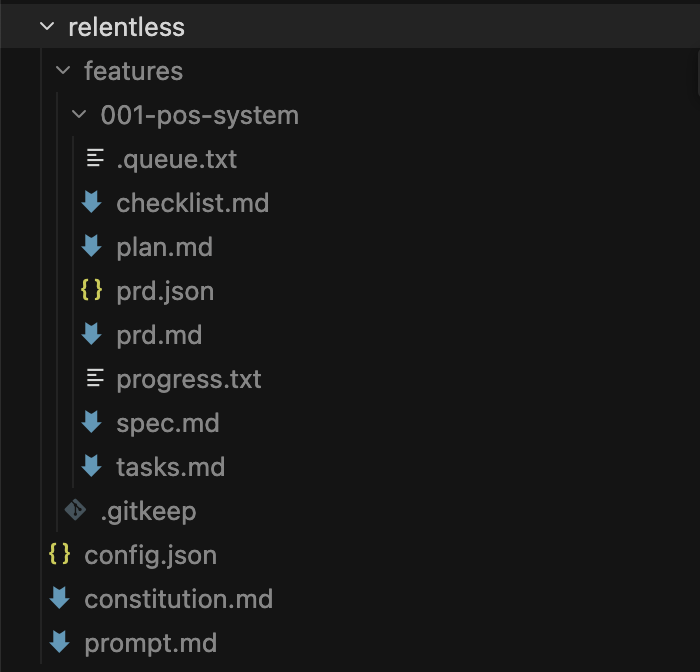
Every iteration runs with full access to this structured context. Changes are committed to Git automatically, and the agent can reason over previous diffs and decisions instead of starting fresh each time.
Relentless also lets you control costs with different modes.
- The free mode uses OpenCode free models for maximum savings on simple tasks.
- Cheap mode uses Haiku 4.5, Gemini Flash, or GPT-5.2 with low reasoning effort, a good balance for most tasks.
- Good mode (the default) uses Sonnet 4.5 for quality-focused development.
- And genius mode brings in Opus 4.5 or GPT-5.2 with high reasoning effort for complex architecture and critical tasks.
If you hit plan limits, Relentless can automatically switch to a different model to keep going.
Getting started with Relentless
First, install Relentless globally:
npm install -g @arvorco/relentless
# or
bun install -g @arvorco/relentless
Then open Claude and run the constitution command to analyze your project:
/relentless.constitutionThis reads your project and creates a custom constitution.md file with project-specific rules.
Once that’s set up, you can create features through the CLI:
# Define your feature
/relentless.specify Add user authentication with OAuth2

# Provide tech stack context
/relentless.plan I'm using React, TypeScript, PostgreSQL

# Auto-generate task list (creates prd.json)
/relentless.tasks

# Validate everything is consistent
/relentless.analyze
Finally, run the agent:
relentless run --feature 001-user-auth --tuiThe --tui flag launches a terminal interface that displays real-time progress as the agent works through each task. You can see which task is active, monitor the agent’s reasoning, and track overall completion without parsing logs.
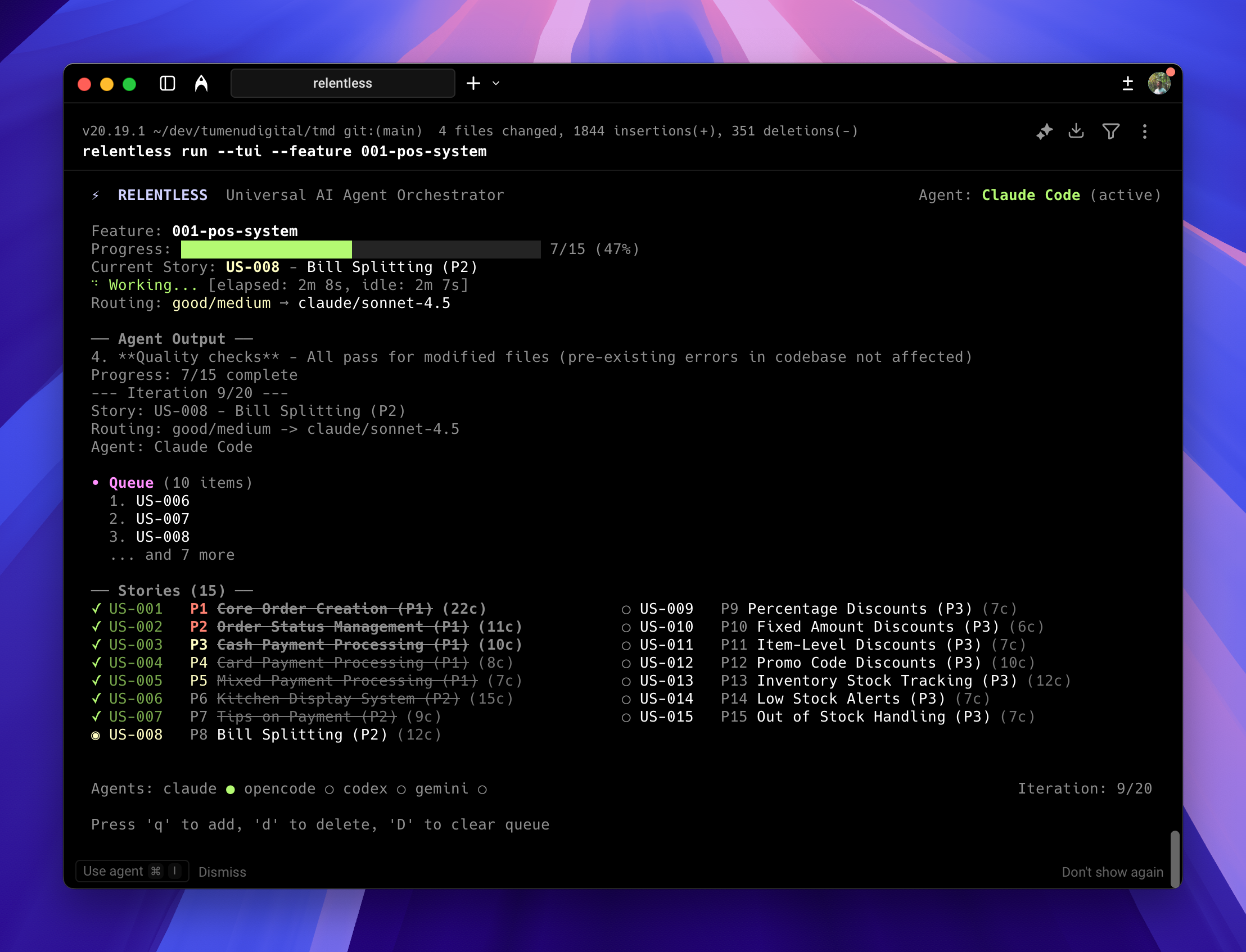
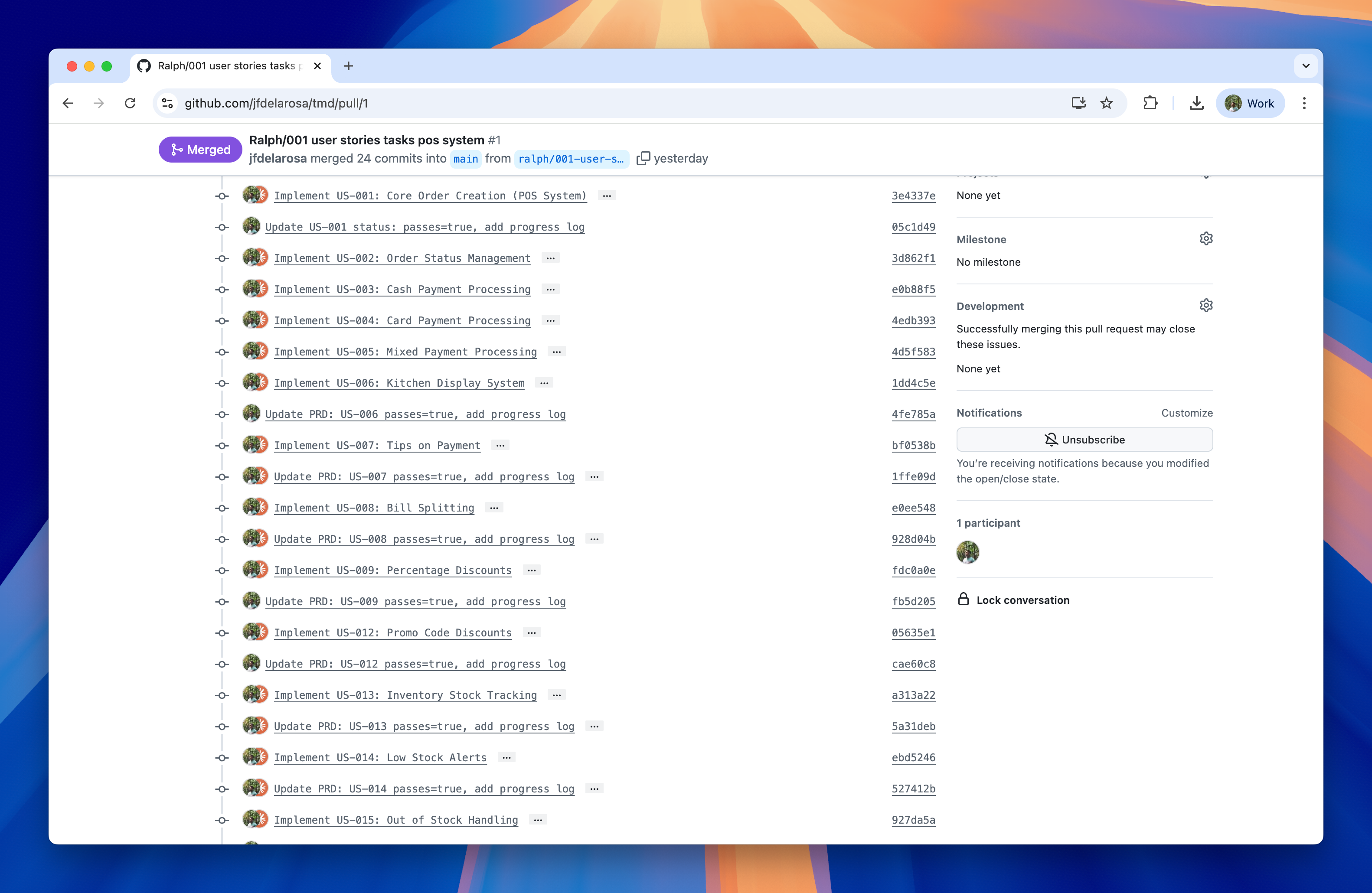
Each completed task produces its own Git commit. This atomic commit strategy makes code review easier and allows you to roll back individual changes without affecting other work.
Choose Ralph Wiggum when:
- You want to understand how the loop works
- The task is exploratory or experimental
- You prefer minimal tooling
- You’re working on a small, personal project
Choose Relentless when:
- You’re building a real feature for production
- You want atomic commits for easy review/rollback
- Multiple people need to understand the agent’s work
- You need consistent project-wide rules across features
- You want to balance cost vs. quality depending on the task
Honestly, I’m still figuring this out.
It’s not autopilot. You still need to review, guide, and sometimes revert. But it’s a different kind of work, more like editing than writing from scratch.
I don’t know where this goes. The tools evolving fast, LLMs getting smarter with each release, and, and what works today might feel primitive in six months. But for now, this is how I build. And for the first time in a while, I’m curious about what comes next.